Project Vision
Eliminating admin friction and fragmentations for the independent workforce.
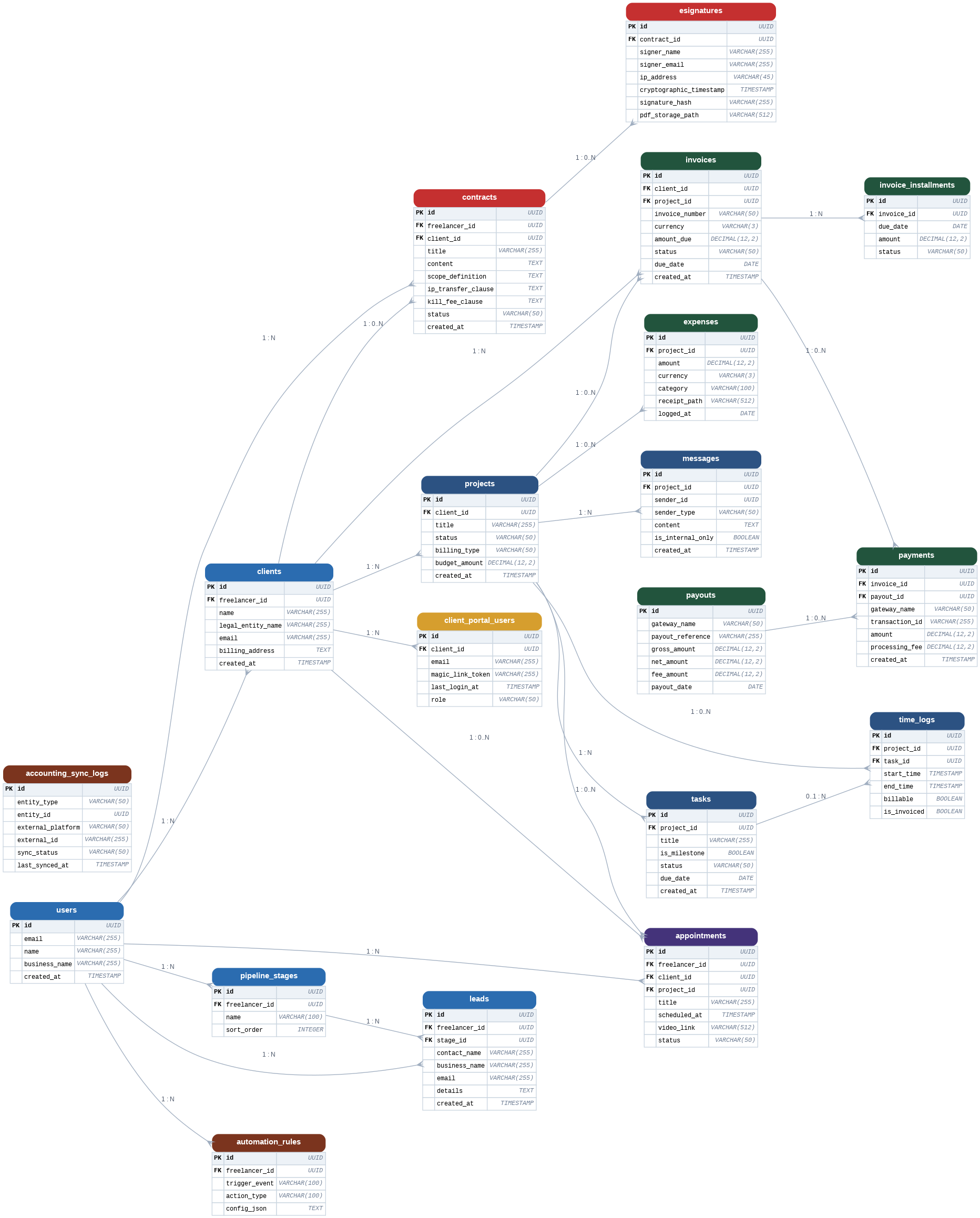
Juggling client relationships, active projects, legal paperwork, and billing consumes roughly 45% of a freelancer's working hours in unpaid administrative overhead. To consolidate all of these daily business operations into a single, cohesive Freelance CRM—frequently referred to as the "Wednesday Trap" solver—the system must deliver nine core integrated functionalities:
1 Lead & Contact Management
- Centralized Database: A single repository to store and organize client names, legal business entities, contact details, billing addresses, and interaction histories.
- Visual Lead Pipelines: Custom visual pipelines (typically Kanban or list views) to track potential opportunities from initial inquiry through to a won contract.
- Lead Capture Forms: Easy-to-build, embeddable forms to capture new leads directly from your website or email inbox.
2 Contracts & E-Signatures
- Legally-Vetted Templates: Dynamic document editors to quickly customize attorney-vetted agreements, placeholders, and scope definitions.
- Must-Have Clauses: Dedicated contract tools must support critical freelance terms, including strict scope definitions, intellectual property (IP) transfer rules, and termination or "kill fees".
- Verifiable E-Signatures: Built-in signing workflows that generate secure signing certificates containing names, email confirmations, IP addresses, and unique cryptographic timestamps, outputting a locked, read-only PDF.
3 Client Portal & RBAC
- Strict Security & Separation: A secure, passwordless (or magic link) client login hub enforced by strict role-based access rules—ensuring Client A can never see files, timelines, messages, or rate sheets belonging to Client B.
- Self-Service Experience: A central workspace where clients can independently upload assets, submit briefs, download deliverables, sign documents, approve milestones, and track invoice statuses.
4 Invoicing, Payments & Retainers
- Integrated Billing: Automatic conversion of logged billable hours, project milestones, or packages into polished professional invoices.
- Online Gateways: Native connections to major payment processors (like Stripe, Square, or PayPal) to accept inline credit card and ACH transactions.
- Financial Flexibility: Support for multi-currency invoicing, customizable payment installment schedules, automated late-payment reminders, and monthly retainer billing.
5 Project & Task Management
- Delivery Visibility: Interactive project tracking views (Kanban boards, list views, or Gantt charts) that break projects into tasks and milestones.
- Collaboration Boundaries: In-context messaging tied directly to specific projects or deliverables, including internal team commenting tools that remain hidden from the client portal view.
6 Time & Expense Tracking
- Billable Hour Timers: One-click active timers mapped directly to client projects and tasks, allowing hours to flow seamlessly into end-of-month invoices.
- Expense Management: Receipt capture tools to log business costs, categorize expenses, and monitor the profitability of individual projects.
7 Built-In Meeting Scheduler
- Availability Sync: Real-time visual scheduling calendars where clients can view open slots and book appointments, automatically avoiding double-booking.
- Workflow Integration: Booking tools must directly link to the active project, automatically populating the core contract timeline with the booked session date and auto-generating video conferencing links.
8 Workflow Automation Engine
- Trigger-Based Actions: Powerful backend rules that handle manual admin work on autopilot. For example, proposal acceptance automatically triggers the contract; contract signature automatically creates the kickoff project and sends the deposit invoice.
9 Accounting Sync & Recon
- Bookkeeping Alignment: Direct bidirectional sync with accounting platforms like QuickBooks Online or Xero.
- Payout Reconciliation: Advanced integration that handles complex financial logic by matching lump-sum payouts with individual gross sales, refunds, processing fees, and chargebacks automatically.