Project Vision & Problem Analysis
Bridging the operational divide between static desktop legal tools and real-world executive mobility through intelligent, automated contract lifecycle governance.
What is Contract Lifecycle Management (CLM)?
End-to-End Enterprise Agreement Lifecycle Governance
Contract Lifecycle Management (CLM) is the strategic, software-driven governance of contracts from initial intake request, drafting, and pre-signature redlining through approval workflows, e-signature execution, and post-signature obligation monitoring to eventual renewal or termination.
Intake questionnaires, automated wizard templates, AI risk auditing, and mobile redlining with segregated internal/external comments.
Dynamic multi-stage approval routing, one-tap mobile approvals with delegation, and touchscreen biometric e-signatures.
AI obligation extraction, milestone compliance checklists, automated renewal date alerts, and CRM/ERP bi-directional syncing.
Top 10 Domain Issues & Mobile App Requirements
Detailed breakdown of organizational pain points paired with corresponding mobile application functional requirements.
Lack of Central Visibility & Scattered Contracts
Organizations frequently store agreements across fragmented silos like shared drives, personal email attachments, and local desktops, making contracts nearly impossible to locate when critical business queries arise.
Centralized Cloud Repository with Smart OCR Scanning
Build a centralized, secure contract database in the mobile app. Field users must be able to use their mobile device’s camera to scan paper contracts, run integrated Optical Character Recognition (OCR) to make the text searchable, and instantly upload files with automated metadata tagging. Global search supports full-text, keyword, and multi-variable filtering (e.g., searching by vendor, contract value, or contract type).
Missed Expirations and Auto-Renewal Surprises
Lacking active post-signature monitoring causes organizations to overlook auto-renewal triggers or critical expiration windows, leading to severe financial penalties, unwanted renewals, or lapsed services.
Push Notification Center for Key Lifecycle Dates
Calculate and monitor Renewal Trigger Dates and expiration schedules. Deliver real-time, customizable push notification alerts directly to deadline owners’ smartphones. Allow users to adjust alert frequency, edit notification verbiage, or initiate renewal requests on-the-go directly from their alert screen.
Slow, Bottlenecked Contract Approval Cycles
Contract approvals frequently stall in endless email chains or sit on travel-occupied managers' desks without any transparency, resulting in delayed deal cycles and lost revenue.
One-Tap Workflows with Interactive Status Dashboards
Develop a robust, mobile-friendly approval engine. Present an interactive workflow progress graph on-screen to show exactly whose desk a contract is on. Provide authorized stakeholders with one-tap approve/reject buttons with quick-comment overlays to resolve bottlenecks immediately, along with the ability to delegate tasks if out of the office.
Friction-Heavy Contract Signing Processes
Transitioning to manual, physical, or offline signature processes slows down execution, especially when traveling executives lack access to printing, scanning, or desktop computers.
Seamless Mobile Touchscreen E-Signature
Integrate secure, industry-compliant e-signature APIs (e.g., DocuSign, Adobe Sign) optimized for mobile touchscreens. This lets internal and external signers securely execute contracts on-the-go, automatically syncing fully-signed PDFs back to the central repository with no manual handoffs.
Inefficient, Messy Pre-Signature Negotiation
Email-based redlining and offline editing lead to version conflicts, lost history, and unvetted contract versions being executed by mistake.
In-App Mobile Redlining & Version-Control Panel
Enable responsive, in-app contract editing and redlining. Include segregated internal vs. external comment streams, strict auto-versioning, and a version-control panel that lets mobile users compare revisions side-by-side or revert to previous drafts with a single tap.
Regulatory Deviations and Contract Inconsistencies
Creating agreements from scratch introduces non-standard vocabulary, bypasses approved corporate playbooks, and invites significant compliance exposure.
AI-Powered Clause Auditor and Template Wizard
Deploy a mobile contract wizard that guides users through intake questionnaires to auto-generate standardized templates. Connect the app to an approved clause library with pre-vetted fallback options and build in an AI auditor to instantly scan drafted or uploaded files and flag high-risk or non-compliant language before execution.
Neglected Post-Signature Obligation Management
Many organizations focus strictly on getting contracts signed, completely ignoring post-execution milestone deliverables, which results in commercial risk and value leakage.
AI-Driven Obligation Extraction & Checklist
Integrate AI obligation-extraction tools that automatically crawl executed agreements to capture milestones, deliverables, and service-level commitments. Present these on an interactive mobile checklist linked to specific department cost centers so owners can track compliance and report progress directly from the field.
Manual and Error-Prone Metadata Entry
Manually entering details like Counterparty IDs, contract values, and notice contacts onto mobile screens is slow, tedious, and highly prone to typing errors.
System Interoperability & CRM/ERP Syncing
Leverage open APIs to connect the mobile application to existing business software (such as Salesforce, SAP, and Deltek Costpoint). Enable bi-directional syncing so data fields auto-populate in real-time, eliminating duplicate manual data entry on mobile.
Enterprise Security and Unauthorized Access Risks
Contracts contain highly confidential and proprietary data, making them primary targets for cyberattacks and internal permission leaks.
Biometric SSO, Role-Based Access, and Audit Trails
Secure the mobile app using enterprise Single Sign-On (SSO) paired with biometric authentication (FaceID/TouchID). Enforce strict role-based security permissions so users can only view or modify what they are authorized to access. Maintain immutable, auditable logging of all system and file activities.
Poor System Adoption and Stakeholder Resistance
Cluttered desktop-style layouts on a mobile screen alienate non-legal stakeholders (sales, finance, procurement), leading to "workarounds" that create security blindspots.
Role-Tailored Dashboards & Interactive Analytics
Ensure high user adoption by designing intuitive, role-based mobile dashboards. Sales users see a deal velocity tracker; Procurement users see supplier risk indicators; and executives see real-time, high-level contract cycle and risk exposure charts.
Pre-Vetted Standard Clause Insertion & Playbook Compliance
New Requirement - Standard Clause LibrariesDrafting or revising agreements on mobile often lacks immediate access to approved corporate legal language, forcing users to write custom text that creates compliance risk or requires lengthy manual legal review.
Clause Libraries Available for One-Tap Assembly
Provide a pre-vetted Clause Library in the mobile application containing standard approved clauses (e.g., Indemnification, Confidentiality, Limitation of Liability, Termination, Governing Law). Users can search, preview fallback options, and insert pre-approved clauses directly into draft contracts with a single tap.
Dynamic User Permissions and Security Management
New Requirement - Role-Based Access Control (RBAC)Enterprises need strict control over who can create, review, approve, or sign contracts. Hard-coded roles limit organizational flexibility, leaving sensitive data exposed or creating bottlenecks when roles change.
Customizable Role-Based Access Control
Create a User and Permission Model allowing Admins to define custom Permission Types (Roles) comprising granular access rights. Admins can assign one or multiple Permission Types to users.
Requirements & Domain Analysis Baseline Completed
Day 1 establishes the functional baseline for the Contract Lifecycle Management Mobile App. The 12 core domain issues and their mobile app solutions guide the upcoming architecture, API specs, and mobile screen designs.
Minimalistic Mobile Application - Extracted Implementation Scope
To build an ultra-lean, fast, and high-impact Minimalistic Mobile Application, the complete requirements set has been filtered to focus strictly on essential mobile workflows. Below are the 6 extracted requirements selected for direct development and implementation:
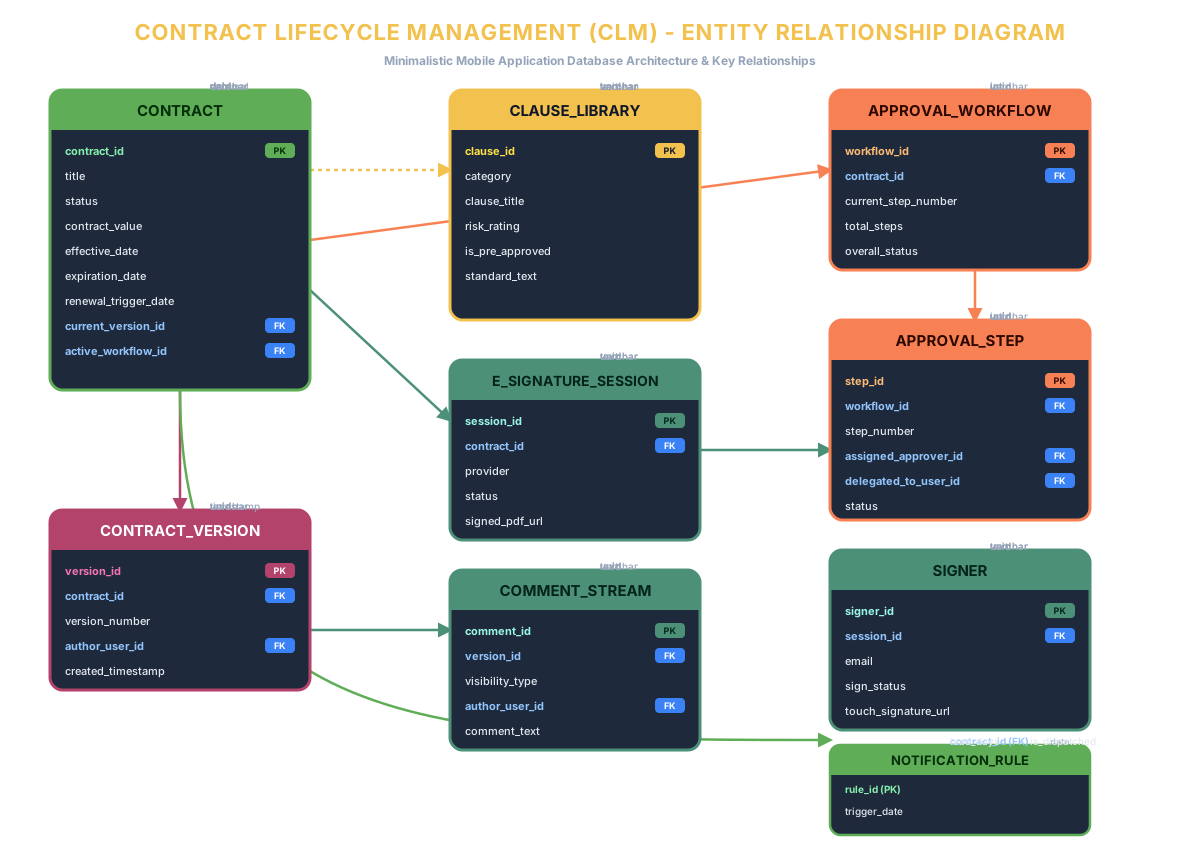
Requirement 2: Push Notification Center for Key Lifecycle Dates
Calculates and monitors Renewal Trigger Dates and expiration schedules. Delivers real-time push alerts directly to smartphones with customizable alert frequency, verbiage editing, and one-tap renewal triggers directly from the alert screen.
Requirement 3: One-Tap Workflows with Interactive Status Dashboards
Mobile-friendly approval engine presenting an interactive workflow progress graph showing contract ownership. Enables authorized stakeholders to approve or reject with one tap, add quick comment overlays, and delegate tasks when out of office.
Requirement 4: Seamless Mobile Touchscreen E-Signature
Secure e-signature API integration (DocuSign/Adobe Sign) optimized for mobile touchscreens. Signers execute contracts on-the-go with native touch signature capture, automatically syncing signed PDFs back to the central repository.
Requirement 5: In-App Mobile Redlining & Version-Control Panel
Responsive in-app contract editing and redlining with segregated internal vs. external comment streams, strict auto-versioning, side-by-side revision comparisons, and one-tap draft restoration.
New Requirement: Pre-Vetted Clause Libraries Available to be Added
Integrated catalog of pre-approved standard legal clauses (Indemnification, Confidentiality, Limitation of Liability, Termination, Governing Law). Users can browse approved clause variants and insert them directly into contract drafts on mobile with a single tap.
New Requirement: Dynamic User Permissions and Security Management
Customizable User and Permission Model allowing System Admins to define custom Permission Types (Roles) and assign one or multiple Permission Types to users, enabling strict, granular control over contract access, creation, and approval workflows.