Complete Data Dictionary
Here is the complete data dictionary followed by the revised ER Diagram reflecting these relationships.
Module 1: Master Data (The Foundation)
1. Ingredient Master (ingredient_master)
- item_id (PK): Unique alphanumeric identifier.
- item_name: Descriptive name (e.g., "Tomato - Roma").
- category_id (FK): Grouping for reporting.
- base_uom: Smallest unit (Grams, Ounces).
- purchase_uom: Buying unit (Case, Sack).
- purchase_to_base_conversion: Multiplier.
- yield_percentage: Usable fraction (e.g., 0.85).
- current_unit_cost: Latest cost per Base UOM.
2. Menu Item Master (menu_item_master)
- menu_item_id (PK): Unique identifier for the dish.
- menu_item_name: Name on the menu.
- sales_category: Entree, Appetizer, etc.
3. Recipe Master (recipe_master)
- recipe_id (PK): Unique connection ID.
- menu_item_id (FK): Parent finished dish.
- item_id (FK): Raw ingredient used.
- quantity_required: Amount of base_uom needed.
4. Location Master (location_master)
- location_id (PK): Unique identifier.
- location_name: Main Store, Banquet Kitchen, etc.
- location_type: Storage vs Production.
5. Supplier Master (supplier_master)
- supplier_id (PK): Unique identifier.
- supplier_name: Vendor name.
6. Reason Codes (reason_codes)
- reason_id (PK): Unique identifier.
- reason_description: Spoilage, Burnt, Dropped, etc.
Module 2: Inflow Transactions (Purchasing)
7. Invoice Header (invoice_header)
- invoice_id (PK): Internal unique ID.
- supplier_invoice_no: External bill number.
- supplier_id (FK): Vendor link.
- received_date: Arrival date.
- invoice_image_path: OCR verification link.
- total_amount: Sum total.
8. Invoice Line Items (invoice_line_items)
- inv_line_id (PK): Unique identifier.
- invoice_id (FK): Link to header.
- item_id (FK): Ingredient received.
- quantity_received: Amount in purchase_uom.
- unit_price: Cost per purchase_uom.
Module 3: Internal Flow Transactions (Requisitions)
9. Requisition Header (requisition_header)
- req_id (PK): Unique identifier.
- request_date: Date of issue.
- from_location_id (FK): Source (Main Store).
- to_location_id (FK): Destination kitchen.
- requested_by_user: Staff ID.
10. Requisition Line Items (requisition_line_items)
- req_line_id (PK): Unique identifier.
- req_id (FK): Link to header.
- item_id (FK): Ingredient issued.
- quantity_issued: Amount in base_uom.
Module 4: Waste Management (Two-Stage Process)
11. Menu Item Waste Log (menu_waste_log)
- menu_waste_id (PK): Unique identifier.
- log_date: Timestamp.
- location_id (FK): Where waste occurred.
- menu_item_id (FK): Dish wasted.
- quantity_wasted: Number of portions.
- reason_id (FK): Why it was wasted.
- logged_by_user: Staff ID.
12. Ingredient Waste Log (ingredient_waste_log)
- ing_waste_id (PK): Unique identifier.
- log_date: Timestamp.
- location_id (FK): Where waste occurred.
- item_id (FK): Raw ingredient to deduct.
- quantity_wasted: Amount in base_uom.
- reason_id (FK): Why it was wasted.
- source_menu_waste_id (FK): Link to parent log (Nullable).
Module 5: Verification & Analysis
13. Physical Inventory Counts (physical_counts)
- count_id (PK): Unique identifier.
- count_date: Timestamp of audit.
- location_id (FK): Area counted.
- item_id (FK): Ingredient counted.
- quantity_counted: Physical amount in base_uom.
- is_offline_sync: Boolean flag.
14. Variance Report Snapshot (variance_snapshot)
- snapshot_id (PK)
- period_start / period_end: Date range.
- item_id (FK)
- opening_stock_qty: Calculated start qty.
- total_purchased_qty: Sum from Invoice Lines.
- total_issued_qty: Sum from Requisition Lines.
- total_wasted_qty: Sum from Waste Log.
- theoretical_closing_qty: (Open + Buy - Issue - Waste).
- actual_closing_qty: From Physical Counts.
- variance_qty / variance_value
- variance_percent: High-level alert trigger.
Revised Entity Relationship Diagram
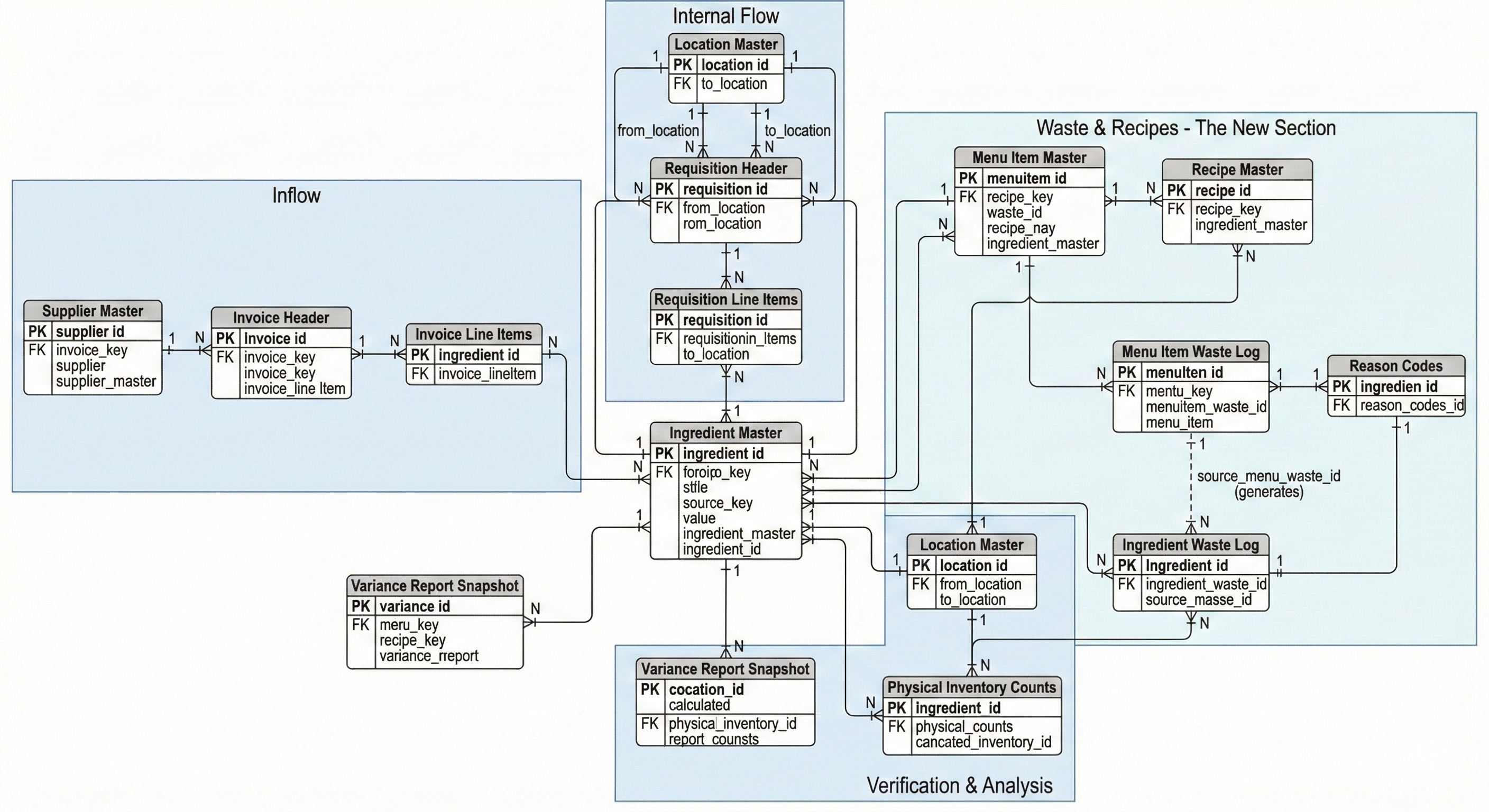
Entity Relationship Descriptions
Detailed description of the entity relationships depicted in the ERD, using standard Crow's Foot notation to define the functional logic of the system.
1. Inflow Module (Purchasing Stock)
Supplier Master (1) ↔ (N) Invoice Header
A single Supplier can send Many invoices to the hotel over time. However, a specific Invoice must originate from exactly One supplier.
Invoice Header (1) ↔ (N) Invoice Line Items
A standard header-detail relationship. One invoice (the document covering the total transaction) contains Many individual line items. A specific line item belongs to only One invoice header.
Ingredient Master (1) ↔ (N) Invoice Line Items
One specific raw ingredient (e.g., "Roma Tomato") can appear on Many different invoice lines across different dates and suppliers. A specific invoice line item refers to exactly One ingredient type.
2. Internal Flow Module (Moving Stock)
Location Master (1) ↔ (N) Requisition Header
Source: One location (Main Store) can act as the source for Many different requisitions.
Destination: One location (Banquet Kitchen) can be the destination for Many requisitions.
Requisition Header (1) ↔ (N) Requisition Line Items
A header-detail relationship. One requisition form contains Many individual ingredients requested by the kitchen. A line item belongs to exactly One requisition form.
Ingredient Master (1) ↔ (N) Requisition Line Items
One ingredient can be requested across Many different requisitions over time. A specific requisition line item refers to exactly One ingredient.
3. Waste & Recipes Module
Recipe Definitions
Menu Item ↔ Recipe: One sellable menu item (e.g., "Cheeseburger") is composed of Many recipe ingredients (Beef, Bun, Cheese).
Ingredient ↔ Recipe: One raw ingredient (e.g., "Salt") can be used in Many different menu item recipes.
Capturing Waste
Menu Item ↔ Waste Log: One menu item can be logged as wasted on Many different occasions.
Reason Codes ↔ Logs: One standardized reason (e.g., "Burnt") can explain Many different waste incidents across both log tables.
Location ↔ Logs: One location (e.g., Main Kitchen) can have Many waste events logged.
The "Recipe Explosion" Relationship (Crucial)
Type: One-to-Many (System Automation)
This represents the system automation. One entry in the Menu Item Waste Log (e.g., "Dropped 1 Burger") automatically generates Many entries in the Ingredient Waste Log based on the recipe.
Note: This relationship is optional for the Ingredient Waste Log, as ingredients can be wasted directly (e.g., spoilage).
4. Verification & Analysis Module
Physical Inventory Counts
Location ↔ Counts: One storage location (e.g., Walk-in Freezer) is audited Many times.
Ingredient ↔ Counts: One ingredient is counted physically on Many different occasions.
Ingredient Master ↔ Variance Report Snapshot
One ingredient will have its variance calculated and stored for Many different reporting periods (e.g., Week 1, Week 2). A single snapshot record represents the calculated performance of exactly One ingredient for a specific period.
Operational Summary
Kitchen Staff
Responsible for Requisitions, Menu Waste logging, and Physical Counts.
Hotel Manager
Oversees Master Data, OCR verification, and Variance Analysis snapshots.